

How the 17.7-inch Touch-Screen in the 2026 Chevrolet Traverse Simplifies Life around Peotone, IL
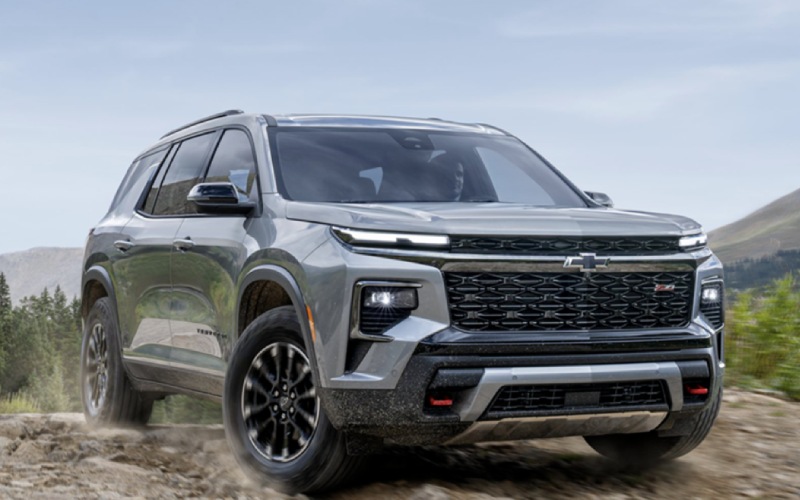
Route 1 Chevrolet - How the 17.7-inch Touch-Screen in the 2026 Chevrolet Traverse Simplifies Life around Peotone, IL
Chevy made the 2026 Chevrolet Traverse a three-row SUV that thinks like your co-pilot, and the standard 17.7-inch diagonal color touch-screen is central to that experience. Because it’s the largest display in its class, the screen reduces tap-hunting and visual clutter by putting the features you use most where your eyes naturally land. The interface pairs with an 11-inch diagonal Driver Information Center for crisp, at-a-glance details — from turn-by-turn prompts to driver-assist status — so you keep focus on the road. Whether you’re juggling school pick-ups, a gym stop, and a grocery run, the Traverse’s layout is designed to minimize swipes and maximize calm, even when plans change mid-errand.
Google built-in compatibility unlocks fast access to Google Assistant, Google Maps, and Google Play without extra cords or workarounds. Use your voice to route to a new address, find the best parking option, or message family while the navigation screen remains front and center. You can tailor the homepage with frequently used tiles — like your preferred map view, contacts, and audio sources — and set profiles so different drivers get their own shortcuts the moment they start the SUV. Around Peotone, IL, where drives often mix local streets and quick highway sprints, this streamlined interface helps you move fluidly from errand to errand with fewer distractions.
On hectic days, clarity matters. Pair the display with available HD Surround Vision for a command-center view that makes parking near busy storefronts or backing out of a tight driveway feel natural. Camera feeds present a high-resolution, overhead-style perspective to help guide you cleanly into your spot. The large screen also supports media that fills the cabin without forcing deep menus or subpages. Whether you’re listening to a podcast on the way to practice or keeping the mood calm during a long appointment day, you can switch sources quickly without breaking your rhythm.
Families benefit from small details that add up. The Traverse’s touch-screen works in tandem with the AutoSense Power Liftgate — when you get close with hands full, it opens without searching for a key or hidden sensor. Inside, Smart Slide Seats help everyone get settled quickly, and the touch-screen displays what you need next rather than burying key steps. If you choose a Traverse with available Super Cruise®, the Driver Information Center confirms hands-free readiness on compatible roads, while the main display keeps navigation and media accessible. The overall effect is less chaos, more clarity, and an interior that quietly does the heavy lifting.
For those who tow on weekends, the display’s clean integration with the vehicle’s systems contributes to confidence. While the Traverse’s included trailering equipment supports up to 5,000 lbs., the digital readouts and visual cues for guidance, drive modes, and available camera views help reduce guesswork. Drivers who regularly visit trailheads or take gear to practice will appreciate how the interface connects the dots from departure to parking to load-out — without crowding the screen or adding steps.
If you’re comparing three-row SUVs and prioritizing everyday simplicity, the Traverse’s dual-display setup feels intuitive on day one and easy to tailor over time. The 17.7-inch diagonal screen scales naturally to your routines — from navigation-first days to audio-first commutes — while the 11-inch Driver Information Center brings your essential data into easy view. Combined with Google built-in and a thoughtful cabin, the interface makes daily driving feel less like a juggling act and more like a coordinated plan.
Frequently Asked Questions:
Can I personalize the display layout?
Yes. You can reorder tiles, set favorite apps, and save unique profiles so each driver has preferred maps, audio, and shortcuts ready at startup.
Does Google built-in require my phone?
No. Google Assistant, Google Maps, and Google Play run natively. You can still connect your phone for calls, music, or app mirroring if you prefer.
How does the screen help with parking?
Pair it with available HD Surround Vision to see high-resolution, low-speed camera views that simplify parking near busy shops and narrow driveways.
Is Super Cruise® information on the big screen?
Super Cruise® status displays on the Driver Information Center, while the main 17.7-inch screen keeps navigation and audio where you expect them.
When you’re ready to try the system in person, Route 1 Chevrolet offers guided walkarounds that highlight display tips, Google built-in shortcuts, and ways to streamline your daily drive. You’ll find a team serving Peotone, Kankakee, and Beecher with helpful demos that show how the Traverse’s interface quickly adapts to your routine.